
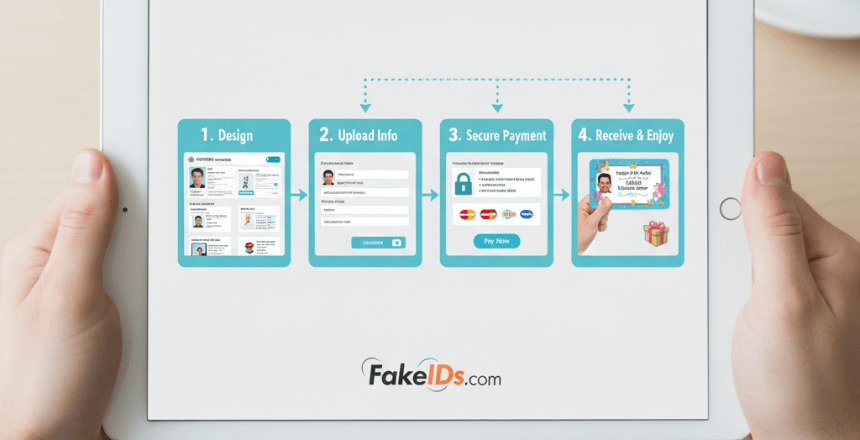
If you've never ordered a custom prop ID before, you're not alone. It's one of those things that looks simple from the outside, but once you click around, you start wondering: "Okay… how do I actually do this the right way?"
That's what this guide is for. We cover this in more detail in Fake ID Website Safety Guide.
I'm not going to throw technical terms at you or talk like a support bot. This is just a normal, human walkthrough of how the process works what details matter, how to take a good photo, what happens behind the scenes, and what you can expect once you hit "submit."
Once you understand the flow, ordering becomes super easy, and honestly, a little fun. Before You Start: Know What You're Ordering
A lot of confusion comes from the word "ID."
So let's clear that up right away:
If you're curious about where the legal lines are, this explains it clearly: Legal Boundaries of Collectible IDs in the US
Once you understand you're making something fun and creative - not something serious - you'll find the whole process much easier to approach. Your Photo: The Part That Makes or Breaks the Card
Let's keep it real: the photo is the biggest factor in how your card will look.
Designers can fix a few things, but they can't magically turn a blurry selfie into a crisp, professional-looking prop. Think of your photo as the "face" of the entire project.
Here's what works best (practically speaking):
Use a real camera when you can (selfies distort your face) Stand against a plain wall Wear something simple and dark so your face stands out Don't stand too close (6-8 feet works well) Good lighting is everything avoid yellow or colored lights Don't tilt your head, keep it neutral
If you want a deeper breakdown with visual examples, here's the full guide: How to Take the Perfect Photo for Your Custom Prop ID
Take your time on this part. A good photo makes the final card look sharp and believable. Your Signature: Optional, But Adds Personality
Not every prop ID needs a signature, but when you include one, it gives the card a nice finishing touch.
- Just sign your name on clean white paper using a black marker.
- Snap a clear picture (flash off).
That's it.
No need to overthink it.
Filling Out the Order Form (And What Each Field Actually Means) For more on this topic, see our guide on Fake ID Group Order Reseller Scams.
Now head to Order Page.
The form looks longer than it really is. Everything is there to help the designer create a clean, well-balanced card, and every field serves a purpose.
Let me break it down like a real person would: Names & Basic Details
These appear exactly as you type them.
Misspellings on the form mean misspellings on the card. Birthdate, Height, Weight, Eye Color, Hair Color
These aren't for verification they're for character building and prop realism.
A lot of filmmakers enter their character's details, not their personal ones. Address (Optional)
If this is for a story or character, feel free to invent an address that fits the scene.
If you don't care, the team can generate a fictional one. Template Choice
Choosing a "state" doesn't mean you're getting a state ID replica. It's just the design style everything remains novelty-based. Photo & Signature Uploads
These go directly into the design workflow.
Nothing is shared, nothing is reused, nothing is sent elsewhere.
If you want to know exactly how your data is protected, read this: How We Keep Customer Data 100% Private Optional Custom Numbers (+$20) The Electronic Frontier Foundation publishes resources on protecting your personal data during online transactions.
If you're working on a film set or creating a prop for a storyline, this lets you add specific dates, ID numbers, or continuity details.
The form is basically you telling the designer how you want your character to "look" on paper. Understanding Pricing Before You Pay
Once you're done with the form, check the pricing page.
The breakdown is simple:
Standard card price Free duplicate with every order Optional upgrades Bulk discounts Secure payment process
If you're ordering for a group (like a cast or a themed event), you'll save more when ordering multiples. How Payment Works (And Why It's Private)
Checkout feels like any normal online purchase.
Payment is processed through secure systems, and none of your full card details are stored on the site.
Depending on your location, you'll see different options, including privacy-friendly digital payments.
If you want a dedicated guide for payment steps, the site links to it during checkout. What Happens After You Submit the Order Our guide on Fake ID Group Order Discount Guide goes deeper into this.
This is the part nobody explains, but everyone wonders about.
Here's a real behind-the-scenes look:
A human designer opens your photo
They adjust lighting, crop it, fix minor issues, and prepare it for layout.
Your details are placed carefully
Spacing, alignment, color balance it's all done manually.
The card is printed on durable material
Teslin, PVC, or Polycarbonate the same feel as high-quality prop cards used in productions.
A physical quality check happens
Misprints, scratches, blur, misalignment everything is inspected.
The card is packed discreetly and shipped
No flashy labels, nothing revealing.
Just a normal envelope.
Most orders ship within 3-5 business days.
You can find shipping info is here. What If Something Goes Wrong?
Because your card is custom-made, refunds aren't possible for typos or incorrect details you typed in.
But the team will replace your order if:
- the card arrives damaged
- the print quality is off
- the details don't match what you submitted
I'd suggest you to checkout our refund policy to know more.
Take a quick photo when reporting issues it speeds things up. Your Data: Where It Goes and What Happens After
This is the part people care about most, and rightfully so.
Your uploaded photos and details are:
- used only to make your prop card
- stored temporarily during production
- deleted within a short window once your order is complete
- never reused, sold, shared, or fed into any system
Everything is handled privately and then removed, no exceptions.
Our Privacy Policy has everything you want to know. Frequently Asked Questions 1. How long does it take to process a custom prop ID?
Most orders are designed, printed, checked, and shipped within 3-5 business days. Large group or bulk orders can take a little longer depending on volume. 2. What type of photo works best for a prop ID?
A clear, well-lit photo taken with a real camera works best. Stand 6-8 feet from the camera, use a plain wall, avoid colored lighting, and keep your head straight. 3. Can I use character details instead of my real information?
Your uploads and order details are used only to create your prop ID and are deleted shortly after fulfillment. Nothing is stored long term or shared with third parties. 5. What if I make a mistake on the order form?
If you spot an error immediately, contact support before production starts. Once printing begins, the team can't change details, but they will replace misprints or damaged items. Final Thoughts: Once You Know the Steps, It's Easy
Ordering a prop ID shouldn't feel intimidating.
It should feel creative like building a character or crafting a small piece of a story.
Once you know:
- how to take a solid photo
- what the form fields mean
- how production works
- what happens to your data
- when to expect shipping
…the rest is smooth and simple.
If you're ready to create your own card, Order Your Custom Prop ID now.
Frequently Asked Questions
How do I order a prop ID online?
Select the state design you want, upload a high-quality photo meeting DMV-style requirements, enter the information for the card, choose your shipping method, and complete payment. Most vendors provide an order confirmation and estimated delivery timeline.
What information do I need to provide when ordering?
You will need a high-quality photo, the name and date of birth for the card, an address, and your shipping details. Some vendors allow you to choose additional options like duplicate cards or rush processing.
How long does a prop ID order take to arrive?
Standard orders typically take 2 to 3 weeks from order placement to delivery. Rush options may reduce this to 1 to 2 weeks. International shipping adds additional time. Be wary of any vendor promising delivery in under a week.